Guideline

How To Use

1.View mode

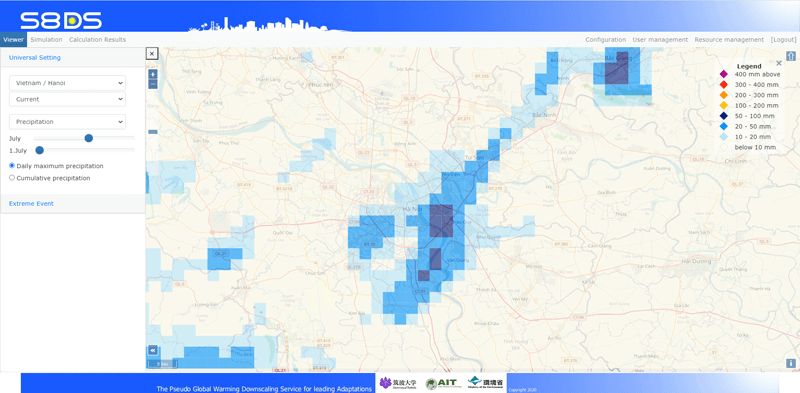
It is mainly designed for government officials related to climate change, and has 3 functions below;

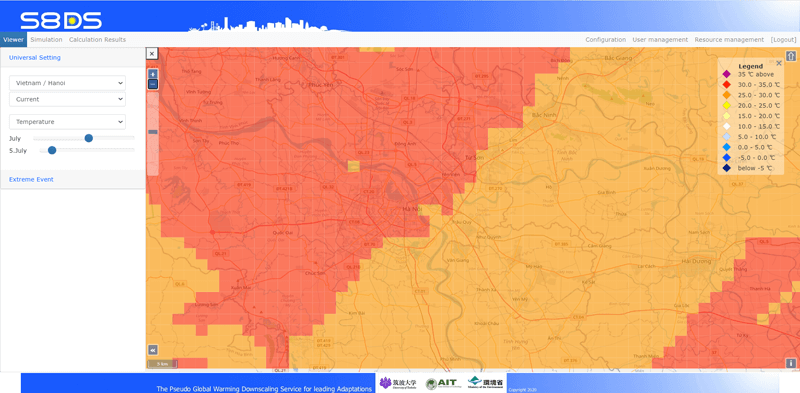
  1. 1.Universal setting Downscaled climate projection data can be viewed for a year when no natural disasters are occurred. University of Tsukuba will register the calculated data in Hanoi and Bangkok by March 2021.
  2. 2.Extreme Event Using past climate data from past disasters (typhoons, floods, and droughts), future data (end of the 21st century) and differences between past and future data can be viewed.
    University of Tsukuba will register the calculated data for a typhoon in Vietnam, a flood in Thailand, and a drought in the upstream of the Mekong River by March 2021.
  3. 3.Sharing (under construction) Some of the simulation results are displayed in View mode as needed. The privilege of the system administrator can only register these data.
2.Simulation mode

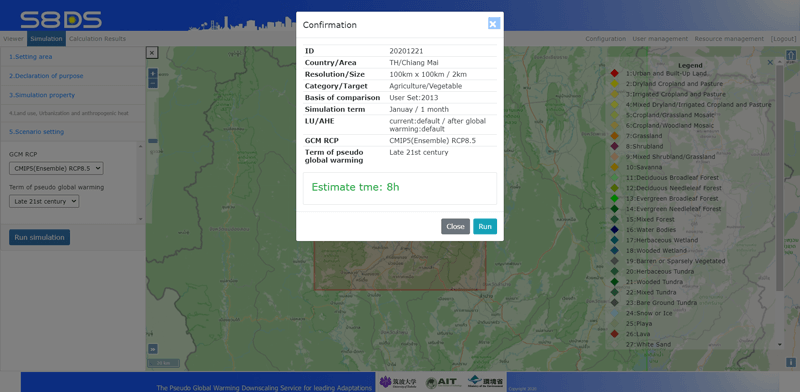
It is mainly a function for climate change professionals or engineers. This function is to set conditions for downscaling to calculate future data in accordance with the following 4 or 5 steps.

  1. 1.Setting area To set a country, city and resolution/region of RCM.
  2. 2.Declaration of purpose To set a purpose to calculate projection data.
  3. 3.Simulation property To set past climate data and simulation term. If you want to compare with the past disaster, you should choose the year and month when the disaster was occurred like the flood of Bangkok in August 2011.
  4. 4.Land use, Urbanization (option) To set a modified land use, urbanization and anthropogenic heat.
  5. 5.Scenario setting To set a GCM/RCP and target projection(i.e. mid-21st or late-21st).
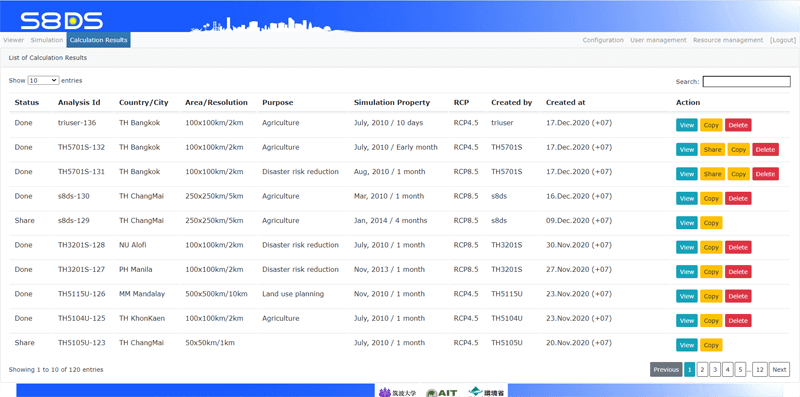
3.Calculation result mode

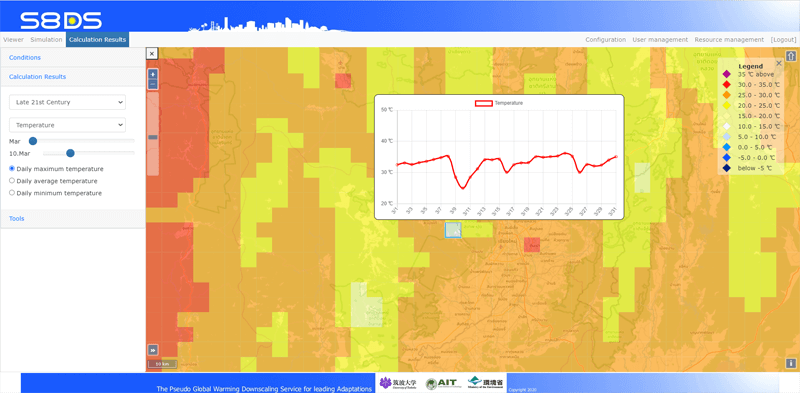
This is a function to confirm the results of the simulation.
Past data, future data, and differential can be viewed in the Web-based GIS.
If necessary, past and future data can be downloaded in CSV or NET-CDF format.

Technical term

1.Global Climate Models(GCM)

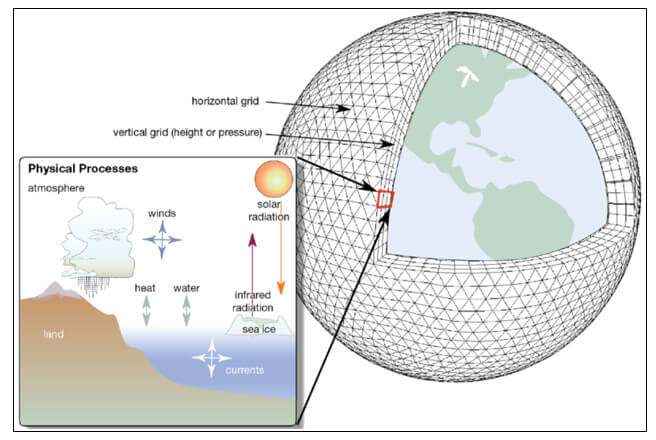
Global climate models (GCMs) are used to simulate complex interactions between the atmosphere, oceans, land surface and cryosphere and include variable such as temperature, precipitation and wind. GCMs are calculated over a three-dimensional array of grids covering the globe.

Many climate change experiments have been performed with GCMs.
Four criteria for selection of which GCM(s)' output to use for an impact study have been suggested: vintage, resolution, validity and representativeness of results.
GCM predictions of climate change may depend upon the choice of point on the control run at which increasing greenhouse gas concentrations are introduce.

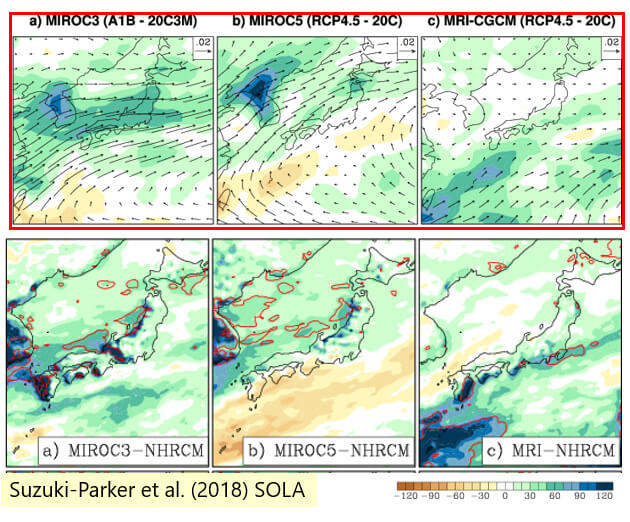
Regional climate projection by downscaling pretty much depend on GCM selection.
For this reason, the S8DS service uses “GCM ensemble”.
GCM ensemble may be averaged together to provide a more robust estimate of the climate change.

2.Representative Concentration Pathways (RCPs) Scenario

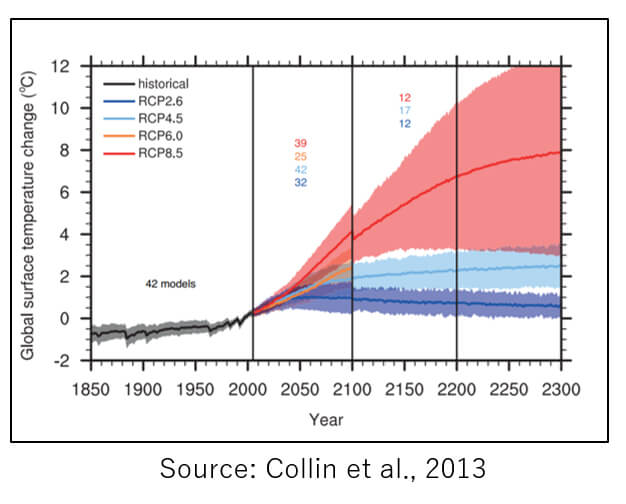
Climate projections are made by running GCMs with prior assumptions about the pattern of greenhouse gas emissions. These are referred to as Representative Concentration Pathways (RCPs).

  1. RCP 2.6: a low scenario that assumes major reductions in emissions and shifts in climate policies, involving action by both developed and undeveloped nations
  2. RCP 4.5: a moderate scenario where emissions peak around mid-century and then decline rapidly over the second half of the century
  3. RCP 6.0: : a moderate to high scenario, stabilize after 2100 at 4.2 and 6.0 W m–2 respectively
  4. RCP 8.5:  the highest scenario, which assumes that we continue on the approximate climate trajectory we are currently on - often referred to as “business-as-usual”
3.The climate downscaling

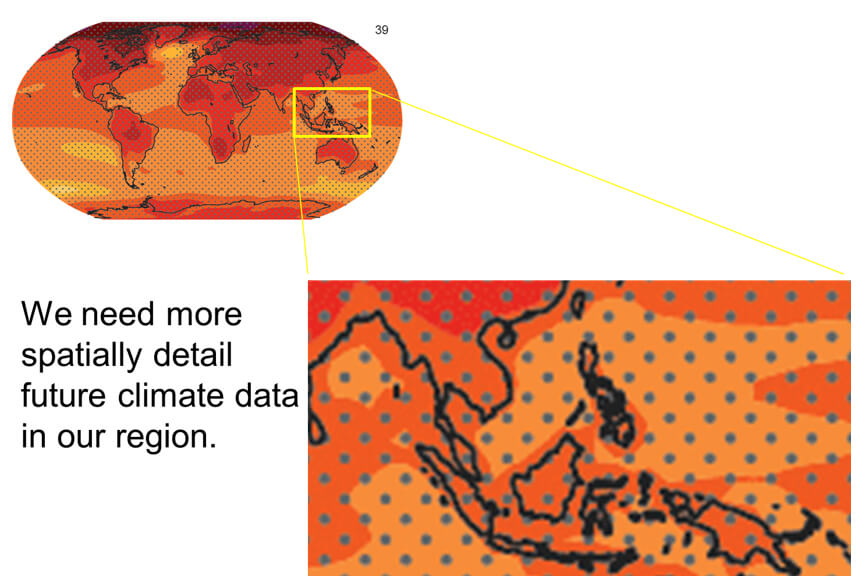
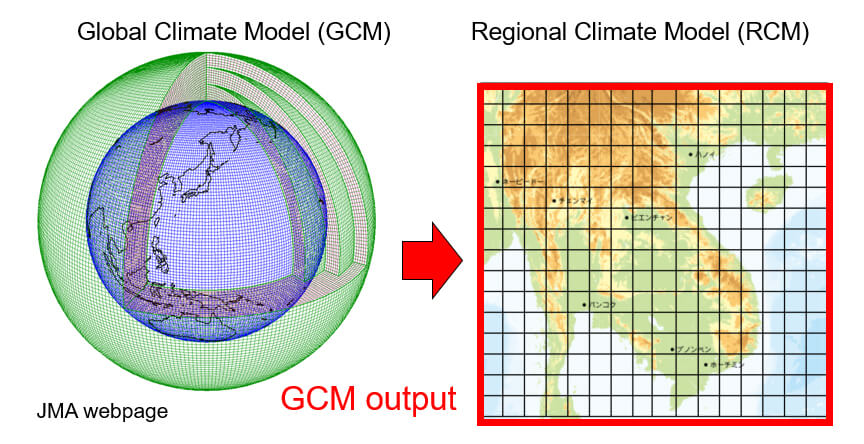
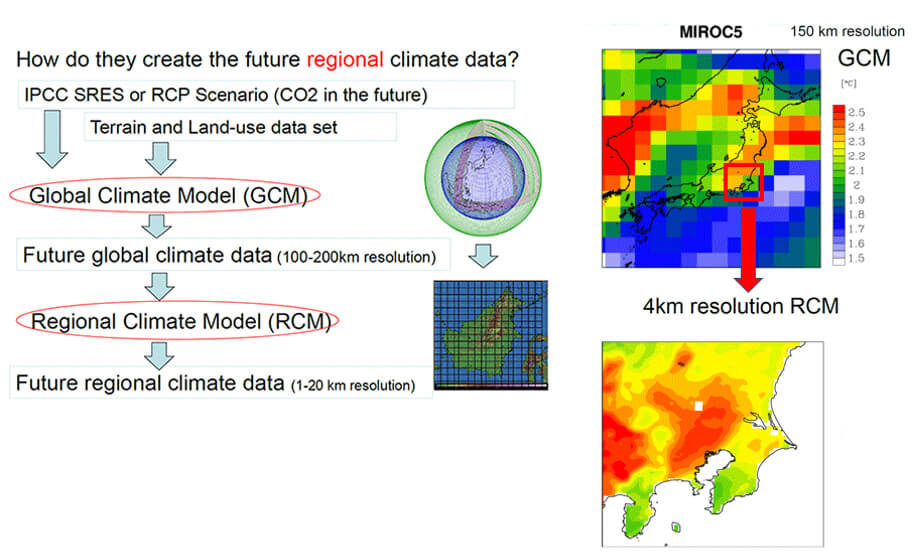
Climate downscaling is a method to create spatially more detail climate data from the GCM output with coarse spatial resolution.

In other words, it is a kind of interpolation, considering detail topography and land-use effects on regional climate with precipitation, humidity, temperature, etc.

Climate downscaling is used for a limited area and considers detail topographic and land-use influences on the regional climate.

4.Three ways in the climate downscaling
Statistical DS Dynamical DS
PGW Direct
Regional climate projection
Computational cost ×
Impact of regional human activity on future regional climate (deforestation, urban planning, energy-use change) ×
Frequency of typhoon, heavy rainfalls, heat-wave, gust × ×
Intensity of future typhoon, precipitation, heat-wave, gust
Change in the intensity of the past record-breaking typhoon, precipitation, heat-wave, gust events causing disasters × ×

The S8DS service is using “Pseudo Global Warming Method”

5.Pseudo Global Warming Method

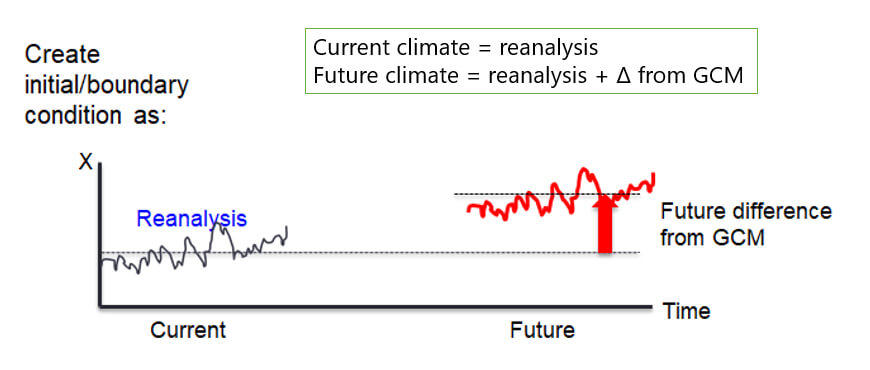
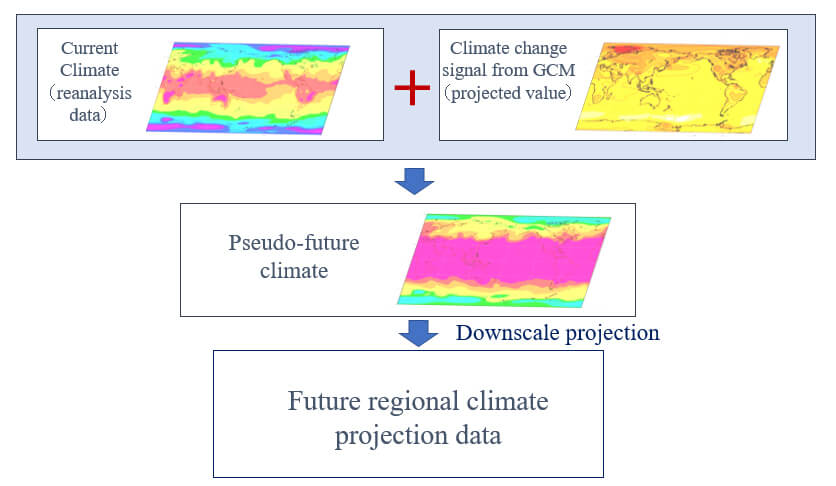
Pseudo-global warming is well known dynamical downscaling method to reduce GCM bias. Pseudo-global warming can reduce GCM bias, however time variation is the same in current and future.

Downscaling from “pseudo-future climate” data, which is a sum of the large-scale “climate change signals” from GCM and “current climate condition (reanalysis data)”

6.Regional Climate Model(RCM)
Dynamical downscaling is a method to make higher spatial resolution data using Regional Climate Model (RCM) and GCM outputs. RCM simulates the past regional climate or predicts/projects future regional climate. RCM needs more spatially detail topography and land-use data set as input data. RCM requires initial and boundary conditions, which are generally created from GCM outputs.

Technical (Advanced)

1.Towards better Climate Downscaling Study

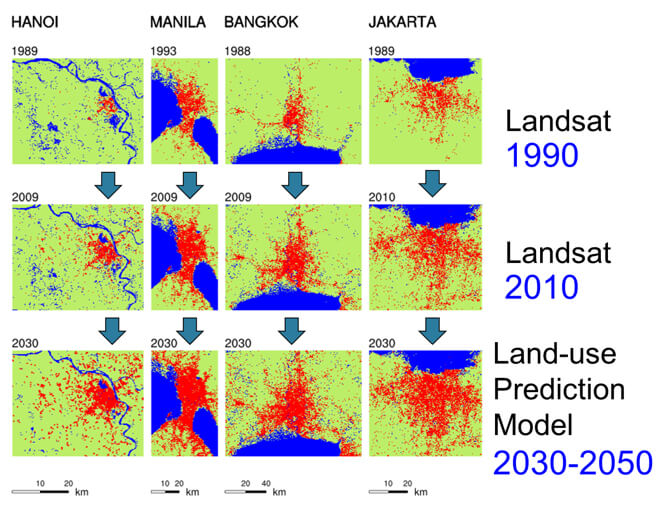
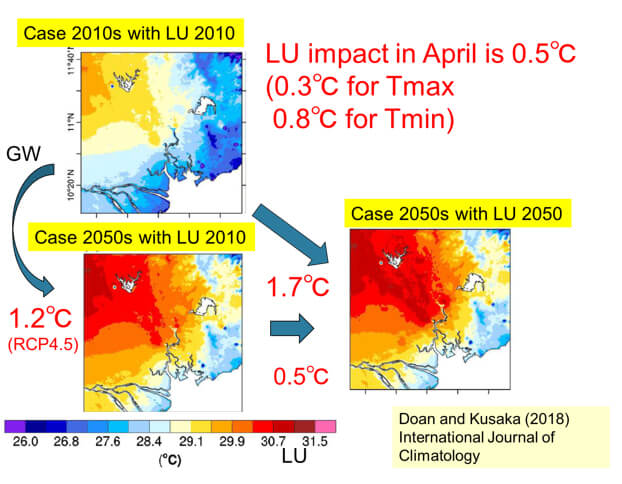
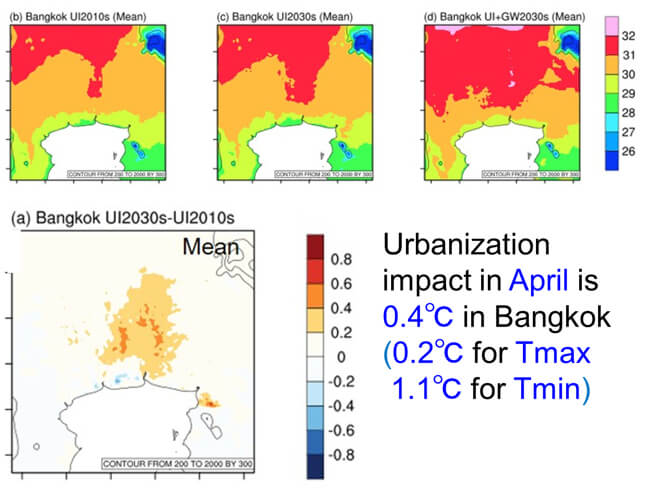
Climate change in urban areas has been influenced by both of global climate change and local urbanization during the past several decades, especially in the Southeast Asian capital cities.

In the future, this tendency will not stop in these cities.

However, most of the climate downscaling studies have not considered future changes of both land-use and anthropogenic heat release.

2.How to modify land use.

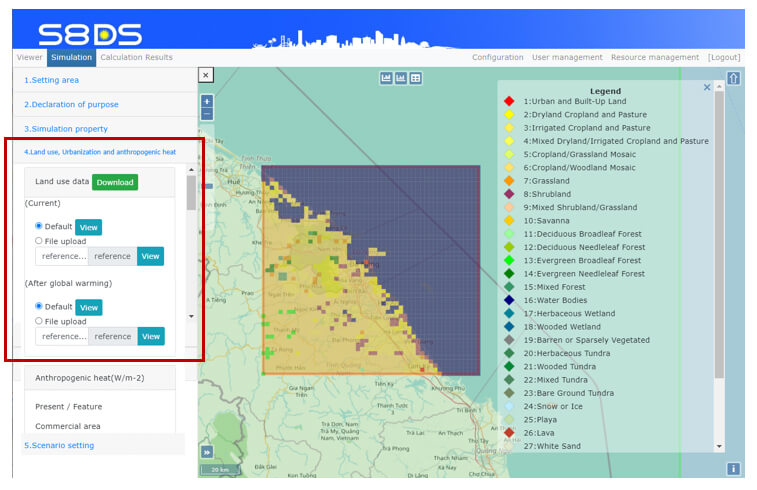
When you choose the “Land use planning” in the “2. Declaration of Purpose”, you can click the “4. Land use, Urbanization and anthropogenic heat”.

The default land use data can be viewed if you clicked “view” button of current or future default likes left figure.

You can download the default land use data(net-cdf format), modify by using GIS or python code and updated it.

*Note: If you have other land use data, please confirm if its data can be load by WRF program which the S8DS service use.

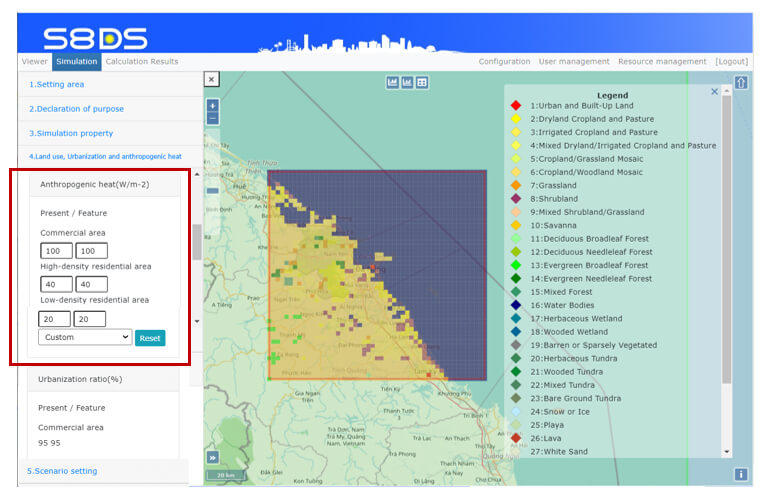
3.How to modify anthropogenic heat.

Main components for anthropogenic heats are followings;
- Industry(power plants, incineration plants, factories)
- Building(air conditioning, other electric instruments, gas)
- Vehicle(engine, air conditioning)

The “Business as Usual(100%)”, “High Development(120%)”, “Slow Development(80%)” and “Custom” as defaults can be selected.

The default parameters are estimated based on cities in Vietnam. However, it is inappropriate for cities in other countries.
If you want to get more appropriate and detailed parameters, please consult to the specialists of urban heat inland in selected countries.

4.How to modify urbanization ratio.

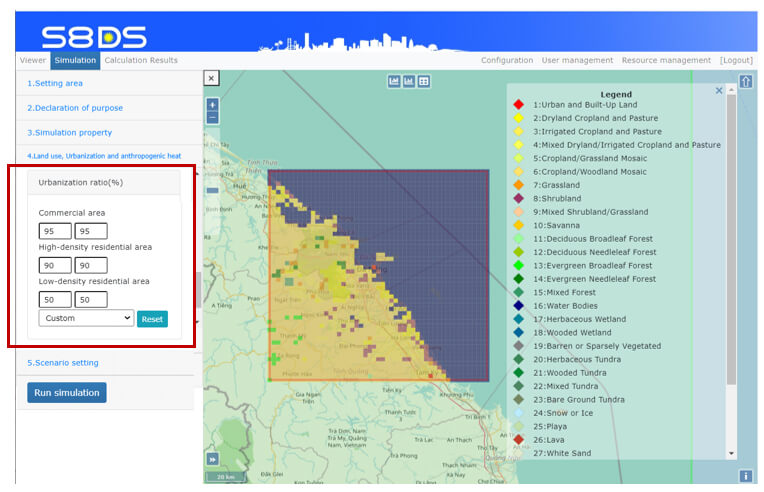
The “Business as Usual(100%)”, “High Development(120%)”, “Slow Development(80%)” and “Custom” as defaults can be selected.

The default parameters are estimated based on cities in Vietnam.

However, it is inappropriate for cities in other countries.

If you want to get more appropriate and detailed parameters, please consult to the specialists of urban planing in selected countries.